

Here we are: just a few days away from Black Friday weekend. For many online stores, Black Friday has technically already begun. Shopping now spreads across the whole of November. But the weekend itself is still a big moment. In the Netherlands, iDEAL recorded 37.8 million transactions in the seven days before Black Friday 2025, and 6.25 million on Black Friday itself.
This isn’t the time to overhaul your webshop. It’s the time to check the essentials, get everyone on the same page and make sure you’re ready for the extra demand.
Is everything in place? Your webshop, your hosting, your integrations, your fulfilment and, of course, your team. Even after weeks of preparation, small things slip through. A final check helps you catch them before they reach your customers, your orders or your team.
Here are seven things you can still check and organise to help the weekend run as smoothly as possible.
1. Walk through your webshop as a customer
Don’t assume everything works just because it did the last time you checked. Go through your webshop the way a customer would, on both desktop and mobile.
Check that you can:
- browse product and category pages,
- add products to your cart and apply discount codes,
- complete the whole checkout, including guest checkout,
- pay with each payment method, using a suitable test order,
- see the right shipping options and delivery estimates,
- receive your order confirmation email,
- see the correct prices, promotions and stock levels,
- find key information, like delivery conditions and returns policies.
Then don’t stop at the easy path. Try a few awkward ones too:
- What happens when someone enters an invalid discount code?
- What if they try to order an out-of-stock product?
- What if they pick a payment method that isn’t available?
These checks don’t take long. But they can catch issues that would otherwise cost you orders on your busiest days.
2. Check the details your customers rely on
A smooth shopping experience isn’t just about getting through checkout. Customers also need accurate information. And everything connected to your webshop needs to work as expected.
What your customers see
- Are your promotions and discount conditions correct?
- Are shipping costs and delivery times clearly communicated?
- Are your returns and refund policies easy to find?
- Are your contact and customer service details up to date?
- Do your FAQs cover the questions customers are likely to ask around Black Friday?
What runs behind the scenes
- Are your payment providers working as expected?
- Are orders syncing correctly with your ERP (the system that manages your orders, stock and finances) or order management system?
- Do stock levels match between your webshop and your inventory system?
- Are your shipping integrations and label generation working?
- Are transactional emails and order notifications going out?
Make sure the promises on your website match what your business can actually deliver. More orders don’t help much if customers end up disappointed by unexpected delivery times, wrong stock information or missing order confirmations.
One last thing: hold off on changing integrations or third-party extensions right now. More on that in tip 6.
3. Check your server capacity and monitoring
More visitors mean more requests. More requests mean more demand on your hosting. So make sure your server has the resources for the traffic you expect, and that you’ll spot problems before they affect your webshop.
A few things to check:
- Recent usage: Are your CPU (processing power) and memory already running high?
- Disk space: Do you have enough, along with your other essential resources?
- Monitoring and alerts: Are they working correctly?
- Past peaks: How did your webshop cope during earlier busy periods, if you have that data?
- Contacts: Do you know who to call if performance starts to slip?
What if traffic is higher than expected?
Does your hosting environment have room to scale?
This is where autoscaling can make a difference. Hypernode’s Horizontal Autoscaling automatically adds server instances when demand rises, then scales them down again when traffic drops. So your webshop can handle changing demand without you having to add capacity by hand for every spike.
- Already using autoscaling? Check that it’s enabled and set up correctly.
- Not using it yet? This probably isn’t the time for a brand new setup. But it’s worth talking through your options with your hosting provider.
4. Get everyone on the same page
Black Friday is a team effort. Everyone should know what’s coming, what they’re responsible for and who to contact if something goes wrong.
A short team meeting or briefing before the weekend is a good way to get there.
Depending on your business, involve these people and teams:
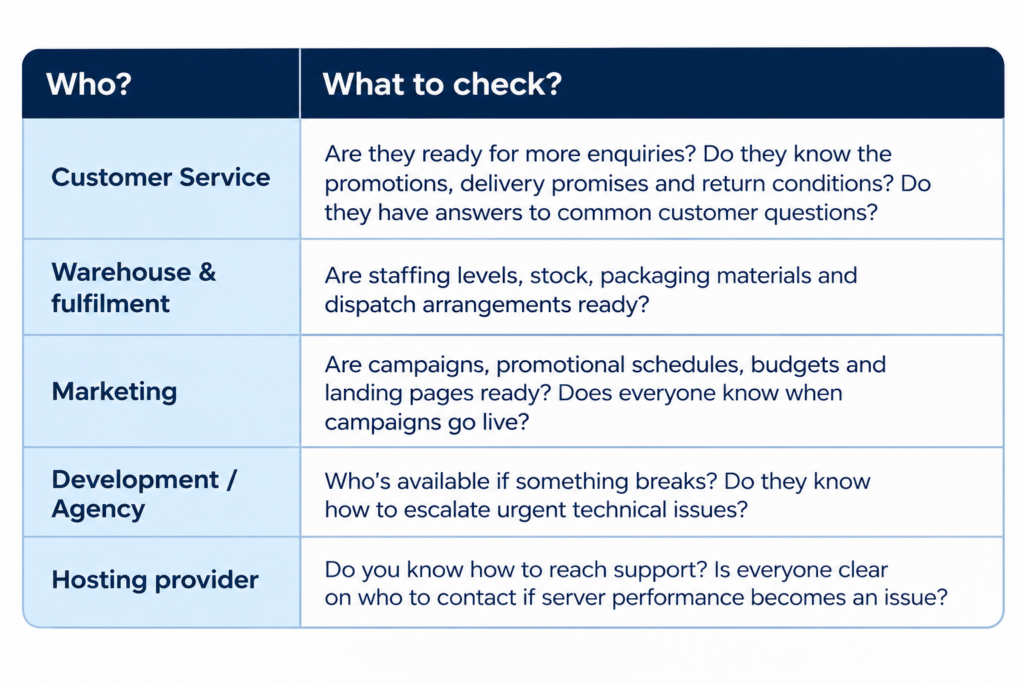
Clarify responsibilities and escalation routes before the weekend, too:
- Who monitors the webshop?
- Who handles customer complaints?
- Who decides what to do if a promotion isn’t working?
- Who contacts the developers if something goes wrong?
Trust us: you don’t want to be figuring this out while orders are piling up.
We really recommend giving customer service extra attention.
They’re often among the first to notice when something isn’t working. And they’re the people customers turn to with questions or problems. Make sure they have the information and support they need to do their jobs.
5. Don’t forget your physical equipment and fulfilment
Not every Black Friday problem happens online. If you run your own warehouse and fulfilment, the physical side of your operation needs to be ready for the extra orders, too.
Check that:
- label printers and barcode scanners work,
- packing stations, scales and other warehouse equipment are ready,
- you have enough packaging, shipping labels and other supplies,
- the warehouse Wi-Fi and network connection are working,
- you have spare equipment or backup supplies where needed,
- courier collections and dispatch cut-off times are clear,
- you have enough people scheduled for the expected order volume.
Work with an external fulfilment partner? Check in with them as well. Confirm they’re ready for the extra orders, and that collection and delivery arrangements are clear.
These might seem like small details. But running out of shipping labels, or finding out a printer isn’t working, is a frustrating way to slow down an otherwise successful Black Friday.
6. Resist the temptation to make last-minute changes
With Black Friday just around the corner, it’s tempting to keep tweaking your webshop. But this probably isn’t the best time for major changes. Anything new can bring unexpected issues, especially when there’s little time to test it properly.
So, for now:
- Avoid unnecessary software updates and new extensions.
- Don’t introduce new checkout functionality or major design changes.
- Leave critical integrations and server configurations alone, unless there’s a good reason.
- Don’t deploy code that hasn’t been properly tested.
There’s one thing you should do, though. Check that your recent backups completed successfully, and that you know who to contact if you need to restore anything.
None of this means ignoring genuine security vulnerabilities or critical bugs. Those should always be fixed, with the right people involved and proper testing.
The goal is to keep things stable. A well-tested webshop that works reliably is worth much more than one extra feature nobody properly checked.
7. Get some rest, trust your preparation and enjoy it
Black Friday can be busy, and sometimes stressful. But it shouldn’t wear out you or your team. Your people are just as important as your webshop, so make sure they’re ready for the weekend, too.
A few final things to arrange:
- Make sure everyone knows their shifts and responsibilities.
- Plan breaks and enough cover, especially for whoever’s monitoring the webshop or handling customer questions.
- Have enough food, drinks and other essentials ready for the team.
And perhaps most importantly? Get a good night’s sleep before the big weekend.
Once things get busy, try not to panic over every small change in traffic. Keep an eye on what matters, trust your monitoring and let your team get on with their jobs.
You’ve got this
Black Friday has grown into a longer shopping period, but the busiest days can still bring plenty of surprises. Not everything will go exactly to plan, and that’s okay.
With a few final checks, a webshop that’s ready for the traffic and a team that knows what to do, you’re in a much better position to handle whatever comes your way.
You’ve put in the work. Now it’s time to make the most of it. Good luck, and enjoy the weekend!
Hi! My name is Dion, Account Manager at Hypernode
Want to know more about Hypernode's Managed E-commerce Hosting? Schedule your online meeting.
schedule one-on-one meeting +31 (0) 648362102